 |
|
|
|

This review was
written by
Samburu.com -
Samburu.com offers adorable pet and animal related gifts and
collectibles for pet lovers everywhere. If you are looking for
unique pet gift ideas, our online store includes hundreds of
collectible items, stuffed animals, and other pet gifts for
specific breeds of dogs, cats, horses and more! No matter the
occasion, you're sure to find the right gifts for the pet lovers
in your life...even if that pet lover happens to be you!
If you want to contact Samburu's freelance developer, you get
reach him on
sales@java-e.com
|
VP-ASP Review from
a retailer's perspective
Summary: Hugely
all-encompassing, flexible, and useful, but a little bit technical.
Summary Pro (For) Points:
1. Optionally a total retail site solution, not just a cart.
2. Hugely encompassing.
3. Very flexible.
4. Easy to install.
5. HTML-Generator Included.
6. Loads of add-ons available from 3rd parties.
7. A great forum for help/advice.
8. Top-quality documentation.
9. Great support.
Summary Con (Against) Points:
1. Lack of "pretty" look-and-feel templates.
2. A bit technical.
3. Initial security measures need to be implemented before release.
Being a retail business (Samburu.com),
and not programmers, we wanted to get a cart which did everything,
and we didn't want to learn programming just to set it up.
Our idea was to set the site/cart up ourselves, then add in all the
product and customer information ourselves, change a few options,
and end up with a finished site that we could unleash on the world
without having to employ a programmer.
VP-ASP allowed us to do exactly that.
It has an unbelievably large number of options that you can simply
switch on/off, and change to your own requirements without having to
make programmatic changes. Most of the options are changed just by
ticking boxes and choosing values from the poplists on the
administration menus.
To give you an idea of the kind of things that you can do in the
admin menu, here's a small sub-set:

Pay particular attention to the "other tables" link at the top of
that sub-set - that allows you to directly edit the data in any of
your tables without you having to create a new/dedicated reference
data screen for it - this is massively useful and helps to save you
yet more development time. This funcionality works for ALL your
tables, and not just the VP-ASP tables, so you can use this to
maintain your NON-VP-ASP data, too.
To give you an idea of the kind of things that you can change in the
configuration, here's a small sub-set, and all configuration options
have corresponding help text included so that you can see what they
do:

There is a down-side to having all these options, which is that
almost everything is in ASP (vbscript) format rather than
straight-forward HTML, which means that if you know basic HTML then
that won't really help you much if you want to make manual
customised changes, because the underlying programs are almost all
in vbscript and not HTML.
You can easily change the headers/trailers and product templates etc
(which ARE in HTML), but if you want to, say, change anything other
than the config options or those headers/trailers/templates, then
you end up having to delve into very complex ASP.
There'll always be a trade-off for this; the more options you have,
the harder it'll be to make manual customised changes. The balance
that they've got at the moment is probably about right, but it is
fairly technical for people who aren't programmers.
What we did was to install it, set our config options to get as
close to our preferred format as we could, and then pasted in our
look-and-feel code/values (menus etc) into the headers and trailers.
After that had been done, we found it necessary to employ a
freelance programmer on an as/when needed basis to change some of
the things that we found too difficult. Although we didn't need to
employ a programmer to get the site up and running, we did find it
necessary for our slightly more obscure changes that couldn't be
changed via the config options or headers/trailers/templates.
If you need to do similar "not normal" customised changes, we'd
advise that you get a programmer to do it for you (preferably
someone who's worked on vp-asp quite a lot), because the programs
are very involved, and if you try to change the ASP code yourself
then you might unwittingly cause errors elsewhere that you're not
expecting. VP-ASP themselves can do such customisations for you
(chargeable, obviously), and they'll make a really good job of it.
But if your site starts to stray away from the standard VP-ASP model
too much, then you're better off getting your own programmer, but
make sure you get a good one - it'll save you a lot of time and
money in the long run - ask for VP-ASP's advice or use word-of-mouth
advice from other VP-ASP users.
So, unless you're an ASP programmer, we suggest that you find
someone who is that you can call-on on an as/when needed basis. If
you're running a large cart/site that's based on ASP, then it's
really essential that you've got someone to hand who can
quickly/easily investigate any problems that you might run into in
the future. For example, if you get a "page can not be shown" error,
and you don't know anything about ASP, then what would you do ? We
just email our developer and say "look at that; can you investigate
and correct it ?"
All the look-and-feel code/values (colours, fonts etc) are
centralised in easy-to-change files that anyone can follow, and it's
up to you how much you want to change things. It uses html templates
for the product pages, so you can change the product pages to
whatever extent you want to very easily. In those templates, you can
also use special fields (eg: "[cimageurl]" for your product's image)
and the asp's will automatically add-in the relevant code for you
when the pages are loaded in a browser.
Something that you should note, is that the look-and-feel of the
site that you get by default is not very appealing; when you first
install it (before you change your config options etc), you'll see
it looks very basic. This is intentional, but a bit annoying. VP-ASP
is an overall cart/site set of files/data, it is NOT a look-and-feel
template. Ideally, we'd like to have seen this come with a set of
template look-and-feel styles that you can choose, but it doesn't,
so you'll probably need to grab hold of a look-and-feel template
(just to get your basic preferred colours and styles and some
graphics etc) and paste that into your headers, trailers, and config
options.
Here's an example of what your product details box might look like
after you've done nothing more than set your config options and
created a product (don't forget that this bit is also surrounded by
the rest of your "frames" for your menus etc - the picture below is
just an example of the box that shows the product detail)...

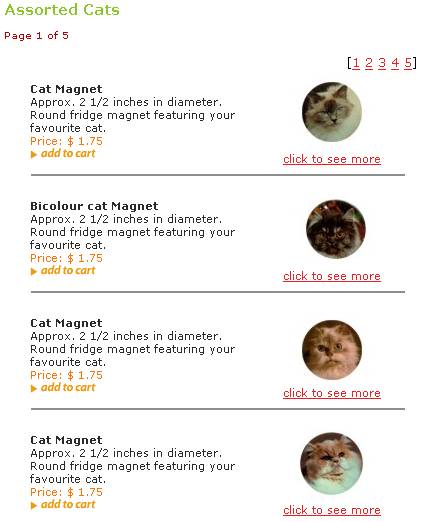
Here's an example of what your product summary (search results) box
might look like after you've done nothing more than set your config
options and created a couple of products (don't forget that this bit
is also surrounded by the rest of your "frames" for your menus etc -
the picture below is just an example of the box that shows the
product summary)...
It's nice that with all the 1000's of options, there are only a
handful of options that you actually need to set (things like your
sitename, and your email address etc), and that if you want to (as
we did), you can get up and running very quickly and change things
later on at your own leasure.
Everything that you need to know is included in their extensive
documentation. They've got guides for different aspects (developers,
retailers etc).
In their documentation, they say that it only takes 5 minutes to get
it installed on your site - and that's true. It's very quick and
easy to install, and then you just go through whatever options you
want to, changing things along the way.
Once you've got it running with a few products in there so that you
can see how it looks/works, you'll be amazed at just how much it
does for you.
To call it a shopping cart is vastly under-rating/under-using it;
you can use it just as a cart if you want to, but in the real world
it's actually a total retailing solution, because included inside
VP-ASP is everything that a retailing site would ever need.
My advice is that before you create a single page for your site, buy
and install VP-ASP, because you'll probably find that it does
everything you'll need.
And as for support, well, that's second to none, really. Not only is
the documentation extensive, but they also have a special VP-ASP
forum where you'll get loads of free help from VP-ASP themselves and
also from the VP-ASP community in general.
If you ever have a "how to?" question, or a "why's this not working
?" question, then my advice is to post your problem/question on
their forum; you'll always get really great help/advice from loads
of people totally free. It's a great little community that they've
got on their forum, with everyone always helping each other out.
We've found that having such a forum/community for the cart that we
use has saved us a fortune in development costs and saved us many
hours of frustration. It's a very friendly forum, and our experience
is that as far as the forum users are concerned, there's no such
thing as a "stupid question" - people will help you, whether it's
something like "how do I make this text bold ?" or "how do I make my
sub-category listings context-dependant ?"
 If all that's not enough, they also have an html-generator, where
you can create html pages for all your products in one go at the
touch of a single button. If all that's not enough, they also have an html-generator, where
you can create html pages for all your products in one go at the
touch of a single button.
After you've done what you can on your own, you can (if you want to)
pay your developer to add in any changes that you don't know how to
do. We've been told that because the code is so well structured and
easy to follow, changes that might seem huge sometimes only end up
taking about half an hour by a decent developer.
The amount of time and money that buying this cart has saved us is
impossible to quantify, but one thing I'm sure about is that we are
extremely impressed by what it does and the community that surrounds
it.
In fact, we liked it so much that we got our developer to build some
extra add-ons (PackingSlip,
Froogle-Feed)
that we now sell through our site to the rest of the VP-ASP
community.
As we said above, it is quite technical, and if you're not a
programmer then you'll really be best to employ one just to do your
final more difficult changes. But we found that's a small price to
pay as everything else is so easy to do.
IMPORTANT! - With the installation documentation, you'll see
various security measures that you can do, things like moving the
database file to a secure folder, changing the admin login screen
name, and so on. We'd strongly advise that you do all these points
BEFORE you copy the files up to a live internet server/host. If you
have any problems with this, then either contact VP-ASP support, or
just post a message in the forum. But whatever you do, DO NOT
copy your files to a live host before applying these security
measures, because there are lots of hacker sites who find such
un-changed files and post "easy-to-hack" messages about the site.
Avoid being put on the hackable site lists, and do these measures
immediately ! VP-ASP is extremely secure as long as you follow their
documented advice on how to install it, but if you don't follow
their security advice, then you WILL be hacked. As VP-ASP is
so widely used, hackers have learned about these installation issues
and constantly try-out their hacks on every new site that appears.
So, don't post your site to the web until you've followed VP-ASP
documented installation security measures. When you've implemented
those measures, then you'll be perfectly safe/secure.
Here's an example of what your final front page might look like
after configuring VP-ASP with your products:

|
|
|
|
|
|


